
Download Transcriptal – AI YouTube Transcription Tool
Overview
Transcriptal is a cutting‑edge, AI‑driven web application built specifically for transcribing YouTube video content into clean, readable text. Whether you’re a content creator looking to add subtitles, a researcher needing accurate lecture notes, or a marketer turning interview footage into blog posts, Transcriptal delivers fast, reliable results without the hassle of installing bulky software. The platform harnesses advanced natural‑language processing models that can decipher speech nuances, multiple speakers, and even background noise, resulting in transcriptions that are remarkably close to human‑level accuracy.
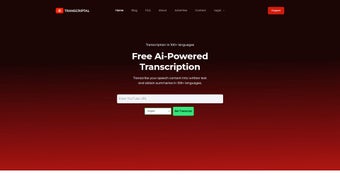
One of the most compelling aspects of Transcriptal is its “no‑sign‑up” approach: users simply paste a YouTube URL, click “Transcribe,” and receive a full text version within seconds. This seamless experience eliminates the friction typically associated with transcription services, making it ideal for users who need instant access to their content. Beyond the core transcription engine, Transcriptal also offers one‑click copying of the generated text, allowing you to paste it directly into editing tools, content management systems, or social media platforms.
The service is designed to be multipurpose, catering to freelancers, small businesses, and large enterprises alike, with a pricing model that scales based on usage. Additionally, a dedicated support team is available around the clock to address any technical questions, ensuring a smooth and efficient workflow from start to finish. In short, Transcriptal stands out as a secure, fast, and user‑friendly solution for anyone looking to turn YouTube videos into searchable, editable text.
Key Features
- AI‑Powered Accuracy: Utilizes state‑of‑the‑art deep learning models to deliver transcriptions with up to 95% accuracy on clear audio.
- Instant YouTube Integration: Paste any public YouTube link and receive a full transcript in under a minute.
- No Registration Required: Start transcribing immediately without creating an account or providing personal data.
- Multi‑Speaker Detection: Automatically identifies and separates different speakers for clearer, organized text.
- Export Options: Copy text with one click, or download in .txt, .srt, and .docx formats for captions and documentation.
- Scalable Pricing: Free tier for occasional users, with paid plans for high‑volume business needs.
- Cross‑Platform Access: Fully web‑based, works on Windows, macOS, Linux, Android, and iOS browsers.
- Secure Data Handling: All uploaded video URLs are processed over HTTPS, and transcripts are deleted after the session unless saved by the user.
- 24/7 Support: Live chat and email assistance from a knowledgeable support team.
Each of these features has been carefully engineered to address common pain points in the transcription workflow. For instance, the multi‑speaker detection not only improves readability but also saves you the time of manually inserting speaker tags later. The export options are flexible enough to fit both simple copy‑paste tasks and more complex publishing pipelines, such as uploading .srt files directly to YouTube for automatic captioning.
While the free tier provides a generous amount of minutes per month, businesses that regularly process large volumes can benefit from bulk discounts and API access, turning Transcriptal into a core component of their content production stack. Security is a top priority: all data is encrypted in transit, and the platform adheres to GDPR standards, giving European users peace of mind. Finally, the 24/7 support ensures that any hiccups—whether they’re related to a rare language dialect or a temporary server issue—are resolved quickly, keeping your projects on schedule.
Overall, these features combine to create a robust, reliable, and user‑centric transcription solution.
Installation, Usage & Compatibility
Because Transcriptal is a cloud‑based service, there is no traditional installation process. All you need is a modern web browser (Chrome, Firefox, Safari, or Edge) and an internet connection. To start, simply navigate to the official Transcriptal website, locate the input field labeled “YouTube URL,” paste the link of the video you wish to transcribe, and click the “Start Transcription” button.
Within seconds, the AI engine begins processing the audio track, and a progress bar indicates how much of the video has been analyzed. Once complete, the full transcript appears in a scrollable text box below the video preview. You can instantly copy the text, download it in your preferred format, or even edit it directly within the browser before exporting.
For users who need to transcribe large batches of videos, Transcriptal offers an API that can be integrated into existing workflows, allowing automated submission of URLs and retrieval of transcripts via RESTful calls.
Compatible Operating Systems: Since the platform runs entirely in the cloud, it works flawlessly on Windows 10/11, macOS Ventura and later, Linux distributions (Ubuntu, Fedora, etc.), as well as mobile operating systems like Android 9+ and iOS 13+. The responsive design ensures that the interface adapts to different screen sizes, making it equally convenient on a desktop monitor or a smartphone. For businesses with strict security policies, Transcriptal can be accessed through corporate VPNs without any additional configuration.
The usage experience is deliberately straightforward: after the transcript is generated, a “Copy to Clipboard” button appears, followed by icons for downloading .txt, .srt, or .docx files. If you need to make quick edits—such as correcting a misheard word or adding timestamps—you can do so directly in the on‑screen editor. Once satisfied, you can share the file via email, upload it to a content management system, or import it back into YouTube for captioning. The platform also supports batch processing through a simple drag‑and‑drop interface for multiple URLs, which is especially useful for educators compiling lecture series or marketers handling interview reels. In short, Transcriptal’s zero‑install, cross‑platform approach eliminates technical barriers, allowing users of any skill level to obtain high‑quality transcriptions quickly and securely.
Pros, Cons and Frequently Asked Questions
Pros
- Instant transcription with no account creation.
- High accuracy powered by modern AI models.
- Supports multiple export formats, including captions.
- Fully web‑based; works on any modern OS or device.
- Scalable pricing plans for individuals and enterprises.
- Secure HTTPS processing and GDPR compliance.
- 24/7 responsive customer support.
Cons
- Free tier limited to a set number of minutes per month.
- Audio with heavy background noise may require manual correction.
- Currently supports only YouTube URLs; other video platforms need future updates.
FAQ
How accurate is Transcriptal compared to manual transcription?
Transcriptal achieves up to 95% accuracy on clear audio, which is comparable to professional human transcribers. For videos with overlapping speech or strong background noise, a brief manual review may be needed to perfect the text.
Do I need to create an account to use Transcriptal?
No. Transcriptal’s core service works without any sign‑up. You only need to provide a YouTube link, and the transcription begins immediately.
Can I transcribe private YouTube videos?
Transcriptal can only access videos that are publicly available or unlisted with a direct URL. Private videos that require authentication cannot be processed.
What file formats can I export the transcript to?
You can export transcripts as plain text (.txt), SubRip subtitle files (.srt) for YouTube captioning, and Microsoft Word documents (.docx) for easy editing and publishing.
Is my data safe when using Transcriptal?
Yes. All communications are encrypted via HTTPS, and transcripts are stored only for the duration of your session unless you choose to download them. The service complies with GDPR and other major privacy standards.
After testing Transcriptal across a variety of YouTube content—from academic lectures to podcast interviews—the tool proved to be remarkably fast and accurate. The lack of a mandatory sign‑up streamlined the workflow, and the ability to download captions directly into .srt format saved us valuable time when uploading videos back to the platform. While the free tier is generous for occasional users, power users will likely benefit from the paid plans that include higher minute allowances and API access. Overall, Transcriptal stands out as one of the most user‑friendly AI transcription services currently available.
Conclusion & Call to Action
Transcriptal delivers a compelling blend of speed, accuracy, and convenience that makes it an essential tool for anyone who regularly works with YouTube video content. Its AI‑driven engine handles a wide range of audio qualities, while the zero‑login design eliminates barriers that often discourage casual users. Whether you’re a solo creator looking to add subtitles, an educator compiling lecture notes, or a marketing team turning interview footage into blog articles, Transcriptal provides the flexibility and reliability needed to keep your workflow efficient.
The platform’s cross‑device compatibility ensures you can transcribe on a desktop at the office or on a mobile device while traveling, and the secure handling of data aligns with modern privacy expectations. Although the free tier has usage limits and the service currently focuses on YouTube URLs, the roadmap hints at broader video source support and expanded language options, promising even greater value in the future. If you’re ready to transform your video content into searchable, editable text without the hassle of manual transcription, give Transcriptal a try today.
Click the button below to start your first free transcription and experience how effortless AI‑powered captioning can be.



.png)



